
NIKLAS CNC Software
CNC software for your machine
We offer our CNC software separately for your existing machine. It shows the NC program, tool path and axes at a glance, guides you through machining and records every program run in the log.
What the CNC software does
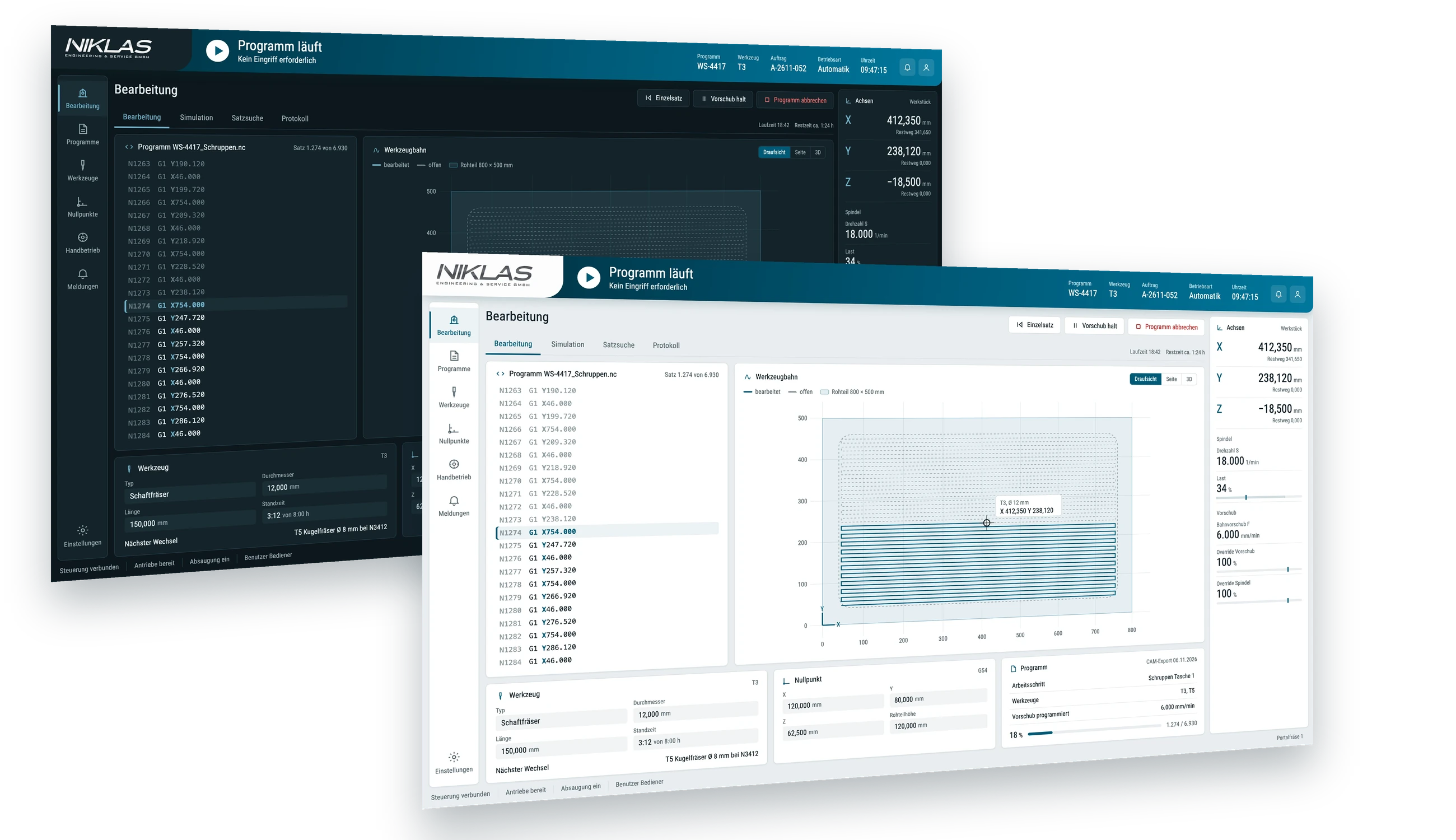
From program start to log: the CNC software always shows where the program, tool and axes stand.
Program and block display
The CNC software shows the running NC program with the current block. Block search and single block mode help when running in new programs.
Tool path
The tool path appears in top view, side view or 3D, with the blank and the current tool position, and shows machined and unmachined sections separately.
Axes, spindle and feed
Axis positions with distance to go, spindle speed, load and path feed are always in view. You adjust feed and spindle via override.
Tools and zero points
Tool data with diameter, length and tool life, the next tool change and the zero points have their own views.
Simulation and manual mode
You simulate programs before starting them. There is a separate manual mode for setup work.
Log
The software records running time, progress and messages for each program in the log.
Does the CNC software suit your machine?
Tell us the machine and controller. We will tell you how we integrate the software there.
The CNC software on your existing machine
You do not need a new machine. We bring the CNC software to your machine, whether built in-house or by another manufacturer.
Discussing the machine
You describe your machine with its controller and axes, the machining and the data you need in the log and in your ERP system.
Connecting the machine
We connect the CNC software to the controller of your machine. We clarify in advance, based on your controller, what can be connected.
Setting up the views
We tailor the views, tool and zero point data and the log template to your machine and machining.
Commissioning
We commission the CNC software on your machine and adapt it when new tools or components are added.
Frequently asked questions about the CNC software
Here we answer what setters and production managers want to know before making an enquiry.
Can we use the CNC software on our existing machine?
Yes. We supply the CNC software separately for your existing machine, whether built in-house or by another manufacturer. We clarify which controller we connect based on your machine.
Which CNC machines is the CNC software suitable for?
We tailor the CNC software to your machine and its controller. We define with you in advance which views you need.
How does the data get into our ERP system?
We define with you during setup which data you transfer from the log and in which format.
Is the software also available for test benches?
Yes. For test benches and test stations, we offer our test software with the same structure. Find out more under Test software.
What if our task goes beyond the functions of the CNC software?
Then we develop the missing parts as custom software. Find out more under Software development.
Enquire about CNC software for your machine
Describe your machine with its controller, the machining and the data you need in the log and in your ERP system. We will get back to you with a proposal for the CNC software.

Simon Niklas
Mechanical engineer, M.Sc.
+49 941 56956720[email protected]
“Good engineering proves itself in day-to-day production. That is why we combine technical planning with a close understanding of process, operation and maintenance.”
Book a consultation