ENGINEERING · INDUSTRIAL SOFTWARE
Software development for industry and manufacturing.
We develop bespoke software, automate workflows and connect machines. Shared dashboards bring your production data together, reducing manual work and giving your team a clear overview.
Selected customers





AUTOMATE YOUR WORKFLOWS
Custom software for your business.
Searching for materials, entering data repeatedly and switching between operator interfaces during faults costs your team time. We develop industrial software that handles these tasks: automating workflows, connecting machines and analysing information from several plants in one place.
01
Automate complete workflows, including rules, checks and subsequent steps
02
Connect machines, controllers and existing software
03
Analyse process values and production metrics in shared dashboards
04
Reduce staffing effort for recurring tasks and free capacity for new orders

Simon Niklas
Mechanical Engineer, M.Sc.
“Show me the workflow that costs you time every day. Together, we establish which steps the software should handle and how it can pay off for your business.”
CONNECT MACHINES & ANALYSE DATA
Industrial plant visualization and SCADA development.
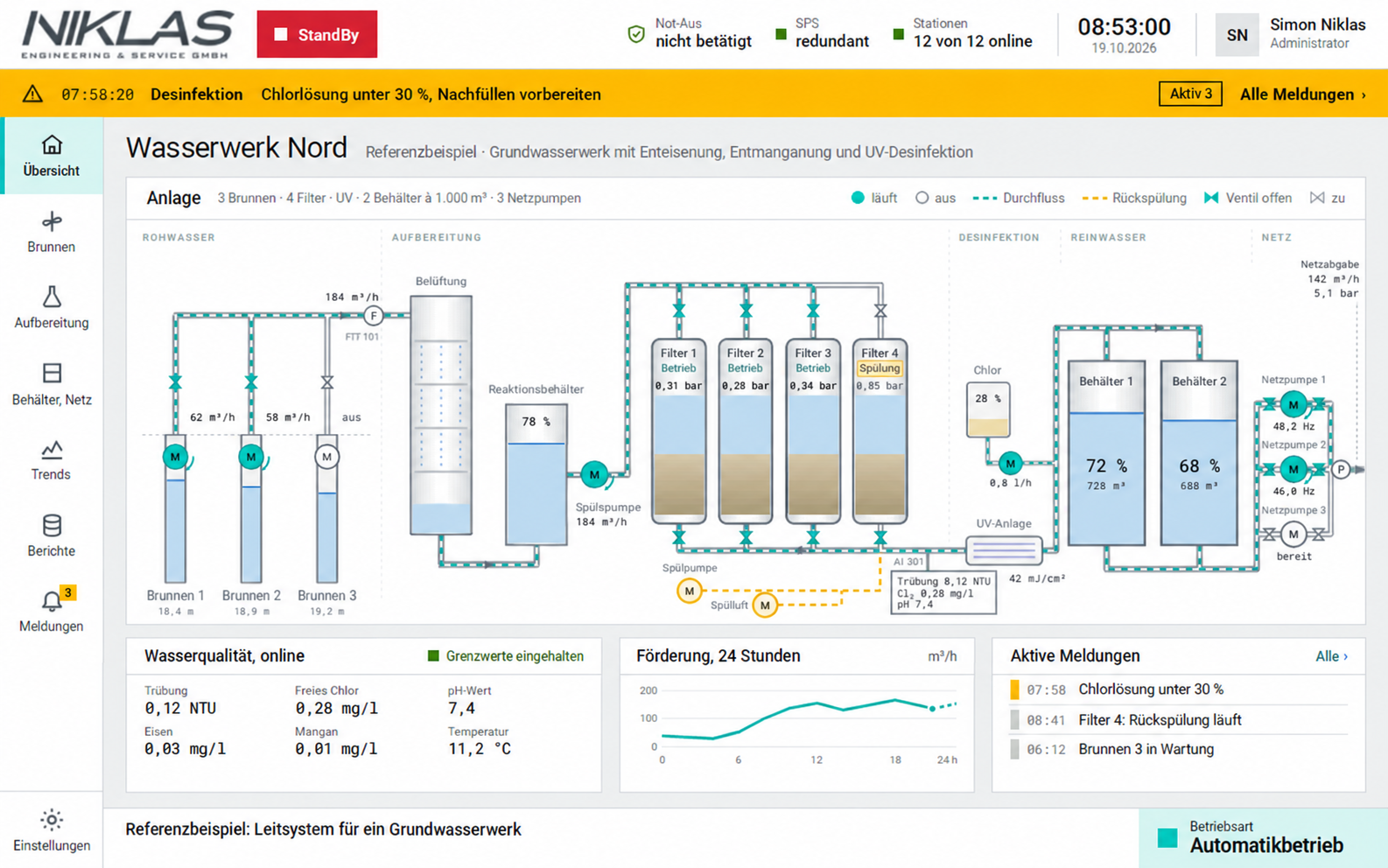
Several machines, different controllers and separate operator interfaces? We develop a shared plant visualization for your operation. Our SCADA software brings machine states, process values and production metrics together in one dashboard. Your team can see which machines are running, where faults occur and how production is performing.
Machine connectivity and data acquisition: Connect common industrial controllers and automatically collect available machine states, part counts, running times and cycle times.
Process visualization and production dashboards: View current values in one place, analyse historical trends and trace deviations to individual machines, stations and time periods.
HMI development and central operation: Change approved setpoints, send operating commands and view alarms. Alarm acknowledgement depends on the controller and the agreed operating scope.
Depending on the project, the software runs in a browser on your company network or as a local application. We establish interfaces, data points, user permissions and approved operating functions before development.
MACHINE DATA ACQUISITION
Machine data acquisition & predictive maintenance
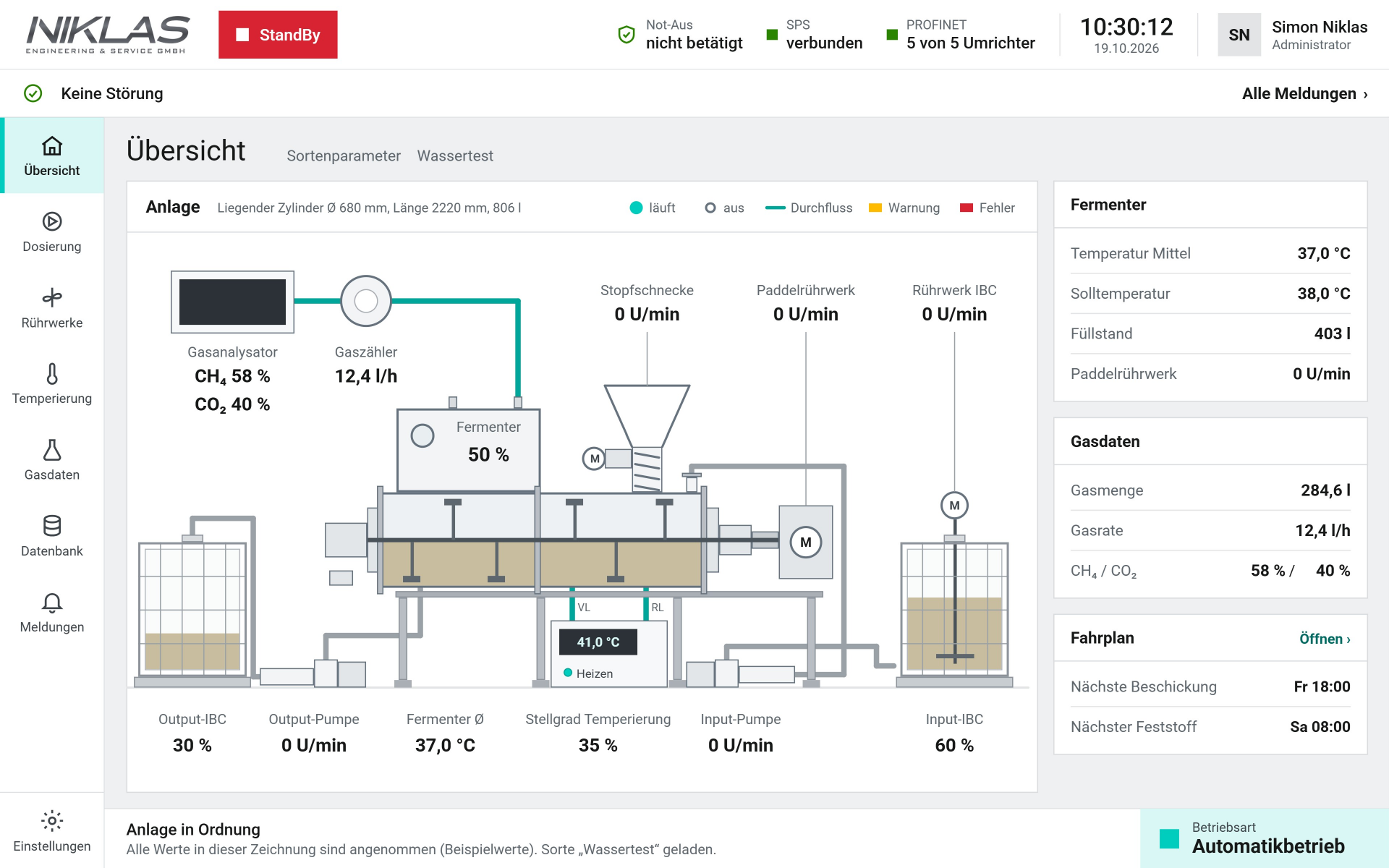
We develop software that acquires machine data, monitors equipment condition and supports predictive maintenance. Operating data and process histories are combined in a shared dashboard. Your team can identify downtime and unusual trends early and use the findings to plan maintenance.
Machine data acquisition: record machine states, running times, part counts and cycle times for each machine and analyse them in a shared production dashboard.
Condition monitoring: compare process values and historical trends, identify deviations and locate the affected machines or stations.
Predictive maintenance: use suitable condition data to identify signs of wear and future maintenance needs. Develop forecasting methods and validate them using your equipment data.
Maintenance planning: bring anomalies, trends and forecasts together in one overview so your team can prepare targeted maintenance work.
Available data and forecasting capabilities depend on the controllers, interfaces and quality of the measurements and historical data. We assess which conclusions can be supported reliably for your equipment.
CUSTOM SOFTWARE EXAMPLES
Software solutions for your business.
These examples show the workflows we can automate with your software. We tailor the functions, interfaces and user experience to your business.
01
Simple inventory management
For small manufacturing and assembly businesses: your team scans goods receipts and withdrawals, finds materials in the right location and checks available stock. The software calculates material requirements for each order, reserves parts and flags shortages for replenishment. This saves time searching, avoids duplicate bookings and makes missing materials visible early.
02
Order and production management
Orders, materials and workstations in one workflow: the software schedules tasks according to your rules, checks material availability and provides the next jobs. Shop-floor feedback updates production progress and triggers subsequent steps. Your team sees what is due next, reducing follow-up questions and manual coordination.
03
Test and quality software
We automate the complete test workflow: import the test order, identify the part, control measurements and assess results against your limits. The software records the process and triggers the agreed approvals or retests. You reduce manual work in recurring tests and receive traceable results for every part.
04
Service and maintenance software
Organise faults, maintenance orders and service jobs in one place: the software assigns reports to the right machine, schedules work and brings together tasks, responsibilities and spare parts. Feedback keeps the status current and triggers agreed follow-up steps. Your team spends less time coordinating and keeps track of outstanding work.
DEVELOPMENT & INTRODUCTION
How we develop your bespoke software.
We start with your actual workflow. We develop and test the solution with your team and compare the real effort before and after introduction.
-
WORKFLOW & GOAL
Understand the work
We record transactions, rules, exceptions and time required. Together, we choose the first complete process and a measurable goal.
-
DEVELOPMENT
Build the software and automation
The interface, business rules and connections are developed around your workflow. Existing data and systems are incorporated as appropriate.
-
PILOT OPERATION
Trial daily tasks
Your team processes real transactions using the new software. We check usability, exceptions and error handling and measure the actual time required.
-
INTRODUCTION
Put it into daily use
Data transfer, training and introduction are coordinated. Usage rights, documentation, operation and maintenance are agreed in advance.
QUESTIONS ABOUT SOFTWARE DEVELOPMENT
Questions about industrial software, SCADA and plant visualization.
Answers about custom workflows, machine connectivity, production dashboards and introducing your software.
- When your workflow needs specific rules, devices or interfaces that a standard application only supports with substantial manual work.
- Frequent transactions, several departments and repeated data entry are useful starting points for automation.
- We compare the benefits with development and operating costs. If an existing standard application suits your needs, we include it in the assessment.
- We design the interface around your team's daily tasks: goods receipt, stock withdrawals, transfers and stocktaking.
- Item photos, clearly named storage locations and barcode or QR scans can simplify operation. We choose suitable devices together.
- Staff trial real transactions before introduction. We check clarity, time required and typical input errors.
- Yes. Once data, interfaces and decision rules are established, software can execute the complete digital process chain.
- Material supply is one example: calculate requirements, reserve stock, trigger replenishment and assign the delivery to an order.
- Human approvals and exceptions are built in deliberately. Physical tasks such as storing goods or assembly still require people or suitable automation equipment.
- We assess existing interfaces, data and access and incorporate suitable systems into the agreed workflow.
- The new application can coordinate inventory, production and test stations while your ERP continues handling commercial tasks.
- Data ownership, permissions, error handling and necessary changes are established before development.
- SCADA stands for Supervisory Control and Data Acquisition: supervisory software for collecting data, monitoring and operating industrial plants.
- Yes. We develop plant visualization software that brings common industrial controllers and several machines or plants across an operation into one interface. Machine states, process values and alarms can be displayed and analysed centrally.
- We assess connectivity using the available interfaces, data points and access permissions. Approved operating functions and the required user permissions are defined for each project.
- Machine data acquisition collects available data directly from connected controllers, such as machine states, part counts, running times, cycle times and process values.
- A production dashboard combines this information for individual machines or the connected production area. Historical trends and analysis help your team investigate downtime and process deviations.
- We agree which metrics your operation needs. Data availability, collection intervals and metric calculations are defined for your machines and processes.
- Yes. Agreed setpoints and operating commands can be transmitted to the connected controllers through the central interface.
- User permissions, required approvals and permitted values are defined in the project. The operating scope is agreed and tested with the plant operator.
- Faults can be acknowledged depending on the controller and plant. Safety-related functions are scoped and assessed separately.
- Both options are possible: a web application on the company network or a local application on a plant or workstation PC.
- We select the deployment approach based on your workstations, existing systems and operating requirements.
- Access, data storage, backups and responsibilities for operation are agreed before introduction.
- We measure the current effort per transaction, including follow-up enquiries, rework and recurring checks.
- During the pilot, we compare the same tasks using the new software. Transaction volumes and saved processing time show the capacity gained.
- Lower expenditure can result from reduced overtime or avoiding additional staffing needs. Freed time can also be used to handle more orders.
- Show us a typical transaction and explain which steps take time or regularly go wrong.
- Existing lists, screenshots, applications and an approximate transaction volume help. We work through any missing information together.
- We then define the first complete process and discuss functions, usability, introduction and ongoing operation.
DISCUSS YOUR SOFTWARE PROJECT WITH US
Which tasks should your software handle?
Whether you want to automate workflows, connect machines or analyse production data, show us where your team loses time or needs better information. We will discuss custom software that fits your processes, controllers and existing applications.