AUTOMATED CNC MACHINE LOADING
Robotic CNC machine tending.
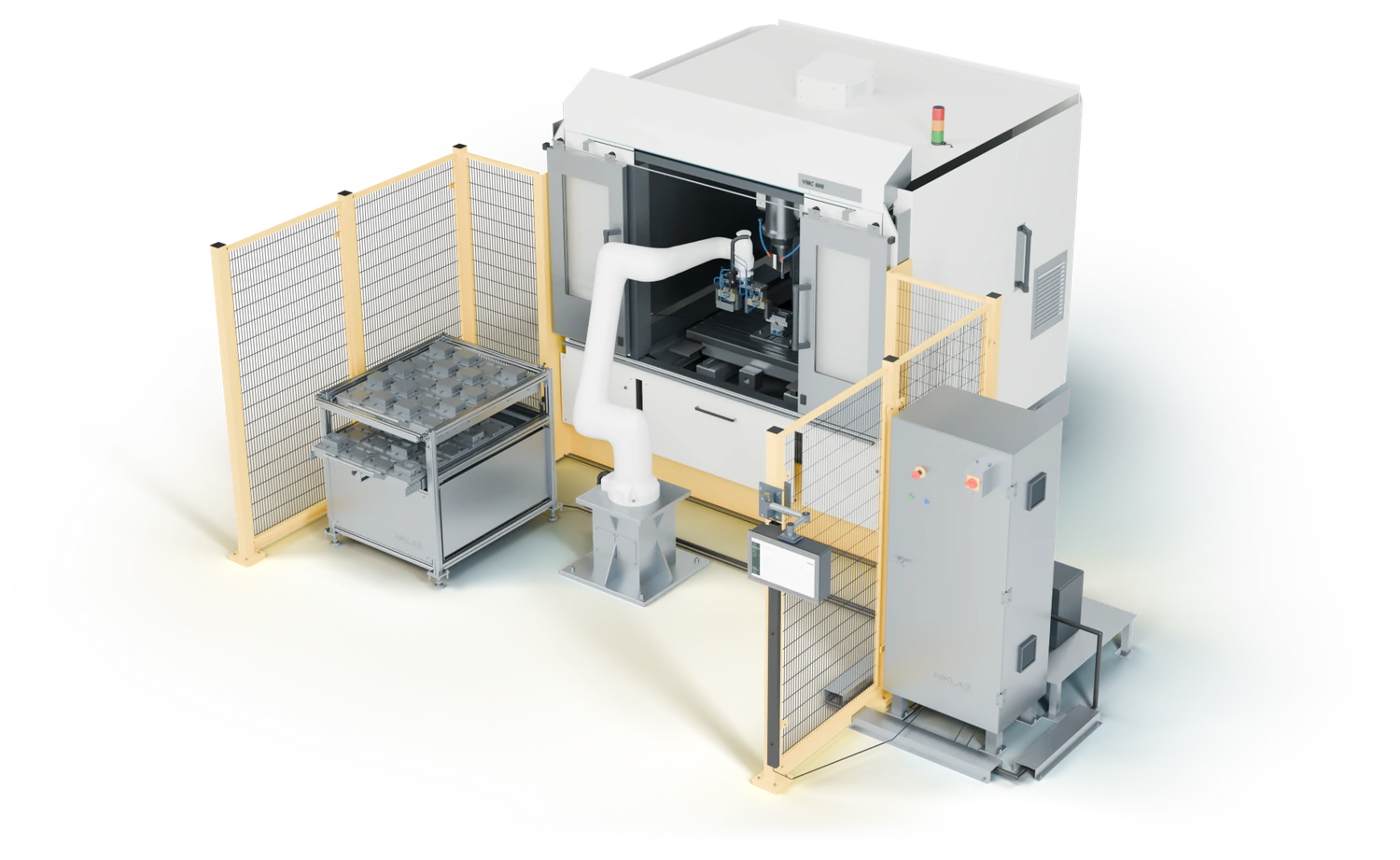
NIKLAS Machine Loader automatically loads and unloads suitable CNC milling machines and lathes. Robot, gripper and parts magazine are configured for your machine and workpieces.
Application
Robotics
Gripper
Magazine
Operation
Connection
NIKLAS MACHINE LOADER
CNC loading that frees up your team.
NIKLAS Machine Loader transfers blanks from the parts magazine to the CNC and places finished parts after machining. Automated machine tending takes over repetitive workpiece changes. The operating period depends on magazine capacity, machining time and the agreed process.
01
Use machine timemore effectively
The robot prepares the next workpiece and changes parts after machining. How long the system can run between manual interventions depends on the magazine, workpiece and process.
02
Focus yourskilled staff
Your team no longer needs to handle every loading task. While machining continues, they have more time for setup, quality checks and other production work.
03
Preparethe next job
Defined workpiece locations help organise blanks and finished parts. The magazine and gripper are specified for your part family and batch size.
04
Automateexisting machines
Existing CNC machines may also be suitable for robot loading. We check access, machine interfaces and workholding, then adapt integration accordingly.
MACHINE TENDING IN DETAIL
A loading cell for milling machines and lathes.
For robotic loading of your CNC milling machine or lathe, we assess part geometry and weight, batch size, workholding, door access and available interfaces. These define the robot, gripper, parts magazine and the sequence between the CNC and loading cell.
01
Workpiece magazine
Defined nests keep blanks in known positions. Capacity, layout and access are specified for the workpiece, batch size and required operating period.
02
Robot and reach
We select a ROKAE robot to match the workpiece, gripper and workspace. The illustrated configuration uses a CR20 to load a CNC milling machine.
03
Gripper and part
Gripper fingers and nests match workpiece shape, surface and clamping position. A dual gripper can combine finished-part removal and loading in one changeover.
04
Door and workholding
The robot needs clear access to the workholding. Door opening, clamping equipment and required interlocks are integrated with the machine sequence.
05
Machine interface
The machine and loading cell exchange the required states: ready for loading, workpiece clamped and machining complete. We check which connection your control supports.
06
Finished part placement
Finished workpieces are placed in designated locations. Blanks and finished parts remain organised for the next production step.
07
Operator station
The interface shows the job, loading sequence and magazine status. An external operator station keeps key information accessible.
08
SAFEGUARDING
Fencing, access points and safety laser scanners where required are specified for the machine layout and operating process. The workspace is considered from the start.
MACHINE LOADER AS AN INTEGRATED SYSTEM
Workpiece transfer between magazine and CNC.
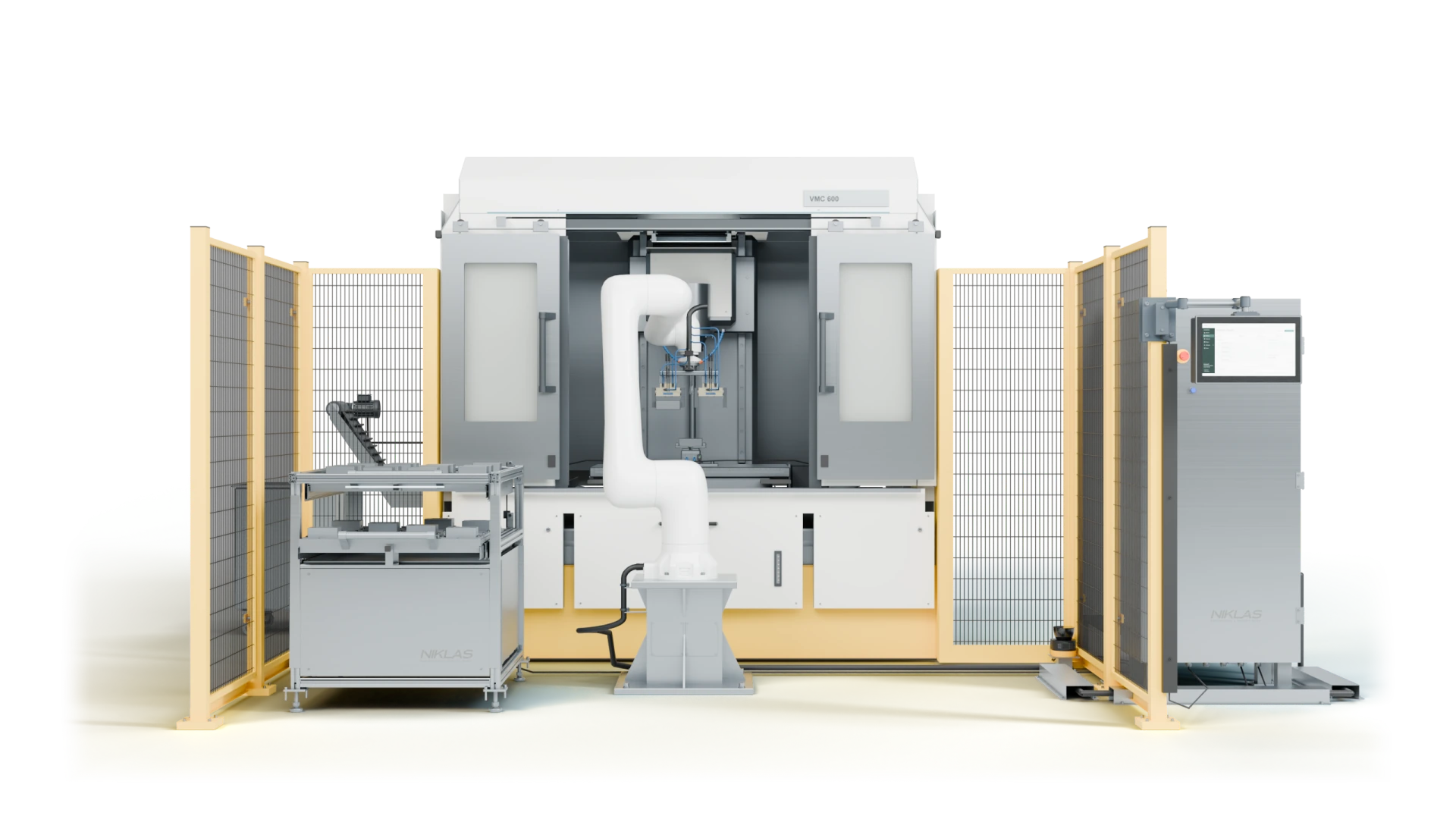
The illustrated CNC loading cell shows the robot, workpiece magazine and machine interface working together. Select an area in the image. We adapt the layout to your machine, workpieces and available space.
01 · MAGAZINE
Supply workpieces in defined positions.
The magazine supplies blanks in defined positions and accepts finished parts. Nests and occupancy are configured for your part family. The illustrated drawers provide access to the magazine.
02 · ROBOT
Automate workpiece changes.
The ROKAE CR20 connects the magazine and CNC machine. It collects blanks, presents them to the workholding and removes finished parts. We specify the robot and motion sequence for your application.
03 · GRIPPER
Handle blanks and finished parts.
The illustrated dual gripper can remove a finished part and insert a blank. Fingers, gripping force and clamping position are designed for your workpieces and the handover to the workholding.
04 · MACHINE
Connect the loading cell and CNC.
Automatic CNC loading integrates the door, workholding and control into the process. We clarify available interfaces and machine interlocks before integration.
05 · OPERATION
Keep the loading process in view.
The external operator station shows the loading sequence, job and magazine status. Your team can check cell status and reach the intended controls.
06 · SAFEGUARDING
Plan access and the workspace.
Fencing and a safety laser scanner form the safeguarding concept in this configuration. Access points and protective fields are specified for the workspace and operating process.
NIKLAS MACHINE LOADER OPERATION
See the job and loading sequence at a glance.
The clear operator interface shows the current job, workpiece positions and next process step. Controls and feedback are adapted to the actual loading process.
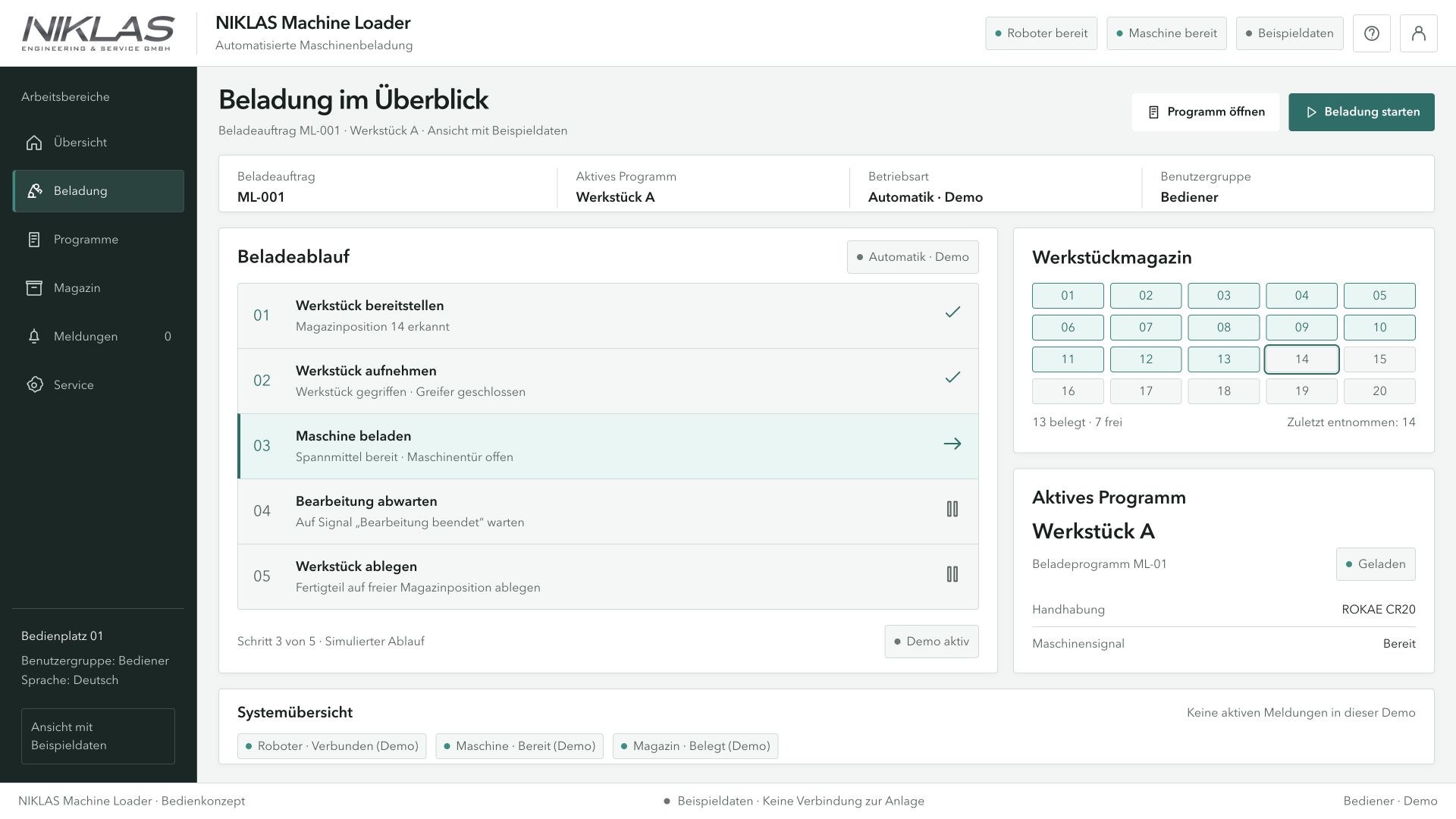
Preview of the NIKLAS operator interface with demonstration data. The final interface is configured for your system.
CLEAR OPERATION IN DAILY PRODUCTION
Understand machine status.
The operator station sits outside the robot workspace. Your team sees the loading cycle and magazine occupancy on one screen and can reach the intended controls directly.
LOADING SEQUENCE
The current process step shows whether a blank is being picked, the machine loaded or a finished part placed.
WORKPIECE MAGAZINE
Defined workpiece locations make occupancy clear. The display is configured for the actual magazine.
STATUS AND DIAGNOSTICS
Robot and machine feedback support operation and help identify the cause of an interruption.
We agree the controls, machine interface and process messages with you.
ENQUIRE ABOUT NIKLAS MACHINE LOADER
How should your machine be loaded?
Tell us the machine model and control, workpiece dimensions and weight, machining time and batch size. Photos of the workspace and workholding help us assess integration. We discuss the appropriate CNC loading system and the points that still need checking.